Design-to-code,
systemized through tokens

TOKEN MIGRATION DESIGN OPS FLUTTER VARIABLE SYSTEMS

A workflow designed to translate design intent into implementation-ready token systems across Figma and Flutter.

Related Tooling

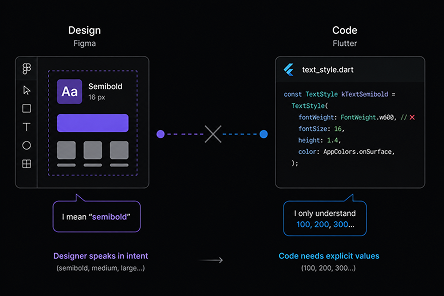
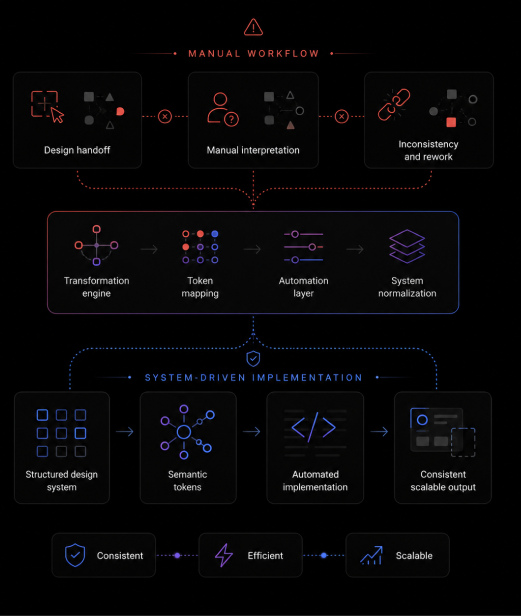
Root Cause

Design systems defined intent visually, while engineering required structured implementation values.

  • No developer-ready export for Figma variables
  • Alias relationships were difficult to preserve
  • Raw values broke semantic consistency


Impact

Without a structured token pipeline, design intent degraded during implementation.

  • Developers manually recreated values
  • UI inconsistencies emerged across products
  • Delivery cycles slowed due to repeated rework
Design intent could not survive implementation without structure.

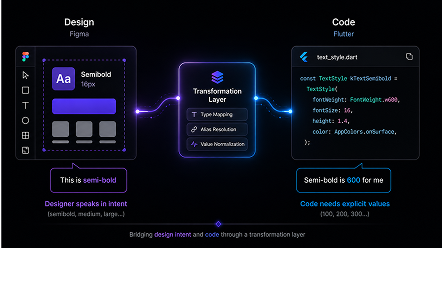
Tokens became the translation layer between
design intent and implementation.

The Approach

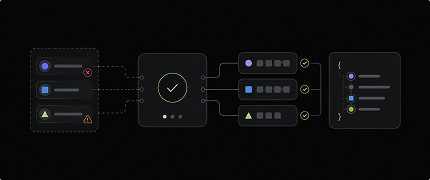
A design-to-code pipeline was introduced, adding a transformation layer between Figma and Flutter.


Instead of relying on manual handoff, this pipeline:

  • Translates design tokens into dev-ready structures
  • Preserves relationships between tokens
  • Aligns design output with Flutter requirements
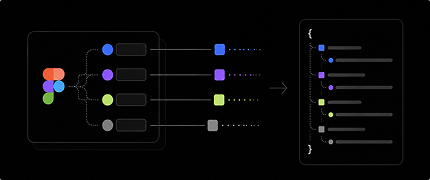
Figma → Tokens → Transformation Engine → JSON → Flutter

Inside the
Transformation Engine

At the core is a transformation engine that bridges design intent and code requirements.


It transforms Figma variables into structured, implementation-ready tokens for Flutter—eliminating manual interpretation during handoff.


This layer becomes a contract between design and engineering.

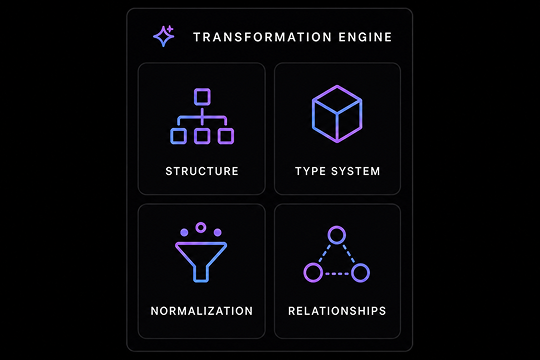
What the engine does


Structure

Transforms Figma variables into structured JSON


Type System

Enforces strict typing (dimension, number, string)


Normalization

Standardizes values for runtime usage


Relationships

Maintains token hierarchy and alias relationships

Design output becomes implementation-ready by default.

Key Transformation

The transformation engine operates as a structured pipeline—each step
progressively refining tokens into implementation-ready data.

Data Type Mapping

Design tokens are exported as generic values without explicit data types- lack of structure

Problem

Flutter requires strict, property-specific data types.

Solution

A type-mapping layer assigns semantic data types (dimension, number, string), ensuring compatibility with Flutter.

Mapping Logic

Token Category Typed Output Mapping
spacing, radius dimension
opacity, elevation, fontWeight number
fontFamily string

Token Type → Data Type Mapping

{
    "radius": {
        "sm": {
        "value": 4
        }
    },
    "opacity": {
        "disabled": {
        "value": 38
        }
    },
    "fontWeight": {
        "semibold": {
        "value": "semibold"
        }
    }
}

Figma Output

(Untyped & Raw)
{
    "radius": {
        "sm": {
        "value": 4,
        "type": "dimension"
        }
    },
    "opacity": {
        "disabled": {
        "value": 0.38,
        "type": "number"
        }
    },
    "fontWeight": {
        "semibold": {
        "value": 600,
        "type": "number"
        }
    }
}

Engine Output

(Typed & Normalized)

Enforces type safety—eliminating ambiguity in data types between tokens and code.

Opacity Scaling

Opacity values are defined using a 0-100 scale in design tokens- scale definition

Problem

Flutter expects opacity between 0-1, not 0-100.

Solution

Opacity values are normalized from 0-100 → 0-1 within the transformation engine to align with Flutter's rendering model.

Transformation Rule

opacity(0-100) → transformation → 0-1
{
    "opacity": {
        "pressed": {
            "value": 80
        }
    }
}

Figma Output

(0-100 scale)
{
    "opacity": {
        "pressed": {
            "value": 0.8,
            "type": "number"
        }
    }
}

Engine Output

(0-1 scale)

Opacity values become directly usable in Flutter—eliminating manual conversion and ensuring consistent visual rendering.

Relative Line Height

Typography tokens define line height as fixed values alongside font size- absolute definition

Problem

Flutter uses relative line height, not fixed pixels.

Solution

Line height is converted into a relative value by dividing it by the font size, aligning with Flutter's typography model.

Transformation Rule

lineHeight(px) → divide by fontSize → relative value
{
    "typography": {
        "body": {
            "fontSize": {
                "value": 16
            },
            "lineHeight": {
                "value": 24
            }
        }
    }
  }

Figma Output

(0-100 scale)
{
    "typography": {
        "body": {
            "fontSize": {
                "value": 16,
                "type": "dimension"
            },
            "lineHeight": {
                "value": 1.5,
                "type": "number"
            }
        }
    }
}

Engine Output

(0-1 scale)

Line height becomes responsive and directly usable in Flutter's text system.

Precision Transformation

Numeric tokens are exported with full floating-point precision- raw precision

Problem

Exported values contain excessive decimal precision.

Solution

Values are rounded to a consistent precision within the transformation engine, ensuring clean and predictable outputs.

Transformation Rule

float → round to precision → clean value
{
    "spacing": {
        "md": {
            "value": 1.200000047
        }
    },
    "opacity": {
        "pressed": {
            "value": 0.799999952
        }
    }
}

Figma Output

(Absolute Value)
{
    "spacing": {
        "md": {
            "value": 1.2,
            "type": "dimension"
        }
    },
    "opacity": {
        "pressed": {
            "value": 0.8,
            "type": "number"
        }
    }
}

Engine Output

(Relative Value)

Values are normalized for consistency and predictable implementation.

Font Weight Conversion

Font weight tokens are defined using semantic naming conventions- naming system

Problem

Font weight is semantic in Figma but numeric in code.

Solution

Font weight tokens are structured using numeric values within the naming convention (e.g., 500, 600) aligned to their semantic meaning in Figma.
During transformation, these numeric values are extracted from the token names and assigned as the final output value.

Transformation Rule

tokenName("500") → parse → numeric weight
{
    "typography": {
        "body": {
            "fontSize": {
                "value": 16
            },
            "lineHeight": {
                "value": 24
            }
        }
    }
  }

Figma Output

(Semantic Labels)
{
    "typography": {
        "body": {
            "fontSize": {
                "value": 16,
                "type": "dimension"
            },
            "lineHeight": {
                "value": 1.5,
                "type": "number"
            }
        }
    }
}

Engine Output

(Numeric Values)

Font weight values are translated into numeric form, ensuring compatibility with Flutter's typography system.

Alias Preservation

Tokens can reference other tokens through alias relationships- separation of concerns

Problem

Export flattens references into static values.

Solution

Alias references are preserved by exporting tokens as reference paths instead of resolved values.

Transformation Rule

alias → preserve referencePath → token link
{
  "color": {
    "primary": {
      "value": "#6750A4"
    }
  }
}

Figma Output

(Resolved Value)
{
  "color": {
    "primary": {
      "value": "{ref.color.primary}"
    }
  }
}

Engine Output

(Reference-Based Value)

Preserves token relationships—enabling scalable theming and consistent system behavior.

Color–Opacity Composition

Figma does not allow opacity to be applied on top of color tokens. To apply alpha, tokens must be detached and converted into raw hex values.

Problem

Figma cannot apply opacity on tokenized colors.

Solution

A compositional approach separates color and opacity while preserving token relationships.
Instead of embedding alpha into color values, the system:

  • Keeps color and opacity as independent tokens
  • Preserves references during transformation
  • Composes values at runtime or export

Transformation Rule

color + opacity → compose → (colorRef, opacityRef)
{
    "button": {
        "container": {
            "color": "{ref.color.primary}",
            "disabled": {
                "color": "#1C1B1F",
                "opacity": 0.12
            }
        },
        "content": {
            "color": "{ref.color.onPrimary}",
            "disabled": {
                "color": "#1C1B1F",
                "opacity": 0.38
            }
        }
    }
}

Figma Output

(Resolved Value)
{
    "button": {
      "container": {
        "color": "{ref.color.primary}",
        "disabled": {
          "color": "{ref.color.onSurface}",
          "opacity": "{ref.opacity.12}"
        }
      },
      "content": {
        "color": "{ref.color.onPrimary}",
        "disabled": {
          "color": "{ref.color.onSurface}",
          "opacity": "{ref.opacity.38}"
        }
      }
    }
  }

Engine Output

(Reference-Based Value)

Preserves token relationships—enabling scalable theming and consistent system behavior.

From Manual Handoff to
System-Driven Implementation


Each transformation is part of a structured pipeline—progressively converting design tokens into typed, normalized, and reference-safe outputs.


  • Introduced a transformation layer—turning raw tokens into implementation-ready outputs.

  • Replaced manual interpretation with typed, normalized, and connected values.

  • Established tokens as a system contract—preserving semantics and relationships.

  • Enabled predictable scaling—reducing ambiguity and accelerating handoff.

Design output becomes implementation-ready—by default.